In short
- Live assist listens to the call as it happens and, after every turn, runs the same engines that score a stored call: the disclosure checklist, sentiment, the fraud score, the call reason.
- The agent sees four things only: the live transcript, a checklist of what is still due, short next-best-action prompts, and knowledge answers quoted word for word from your articles.
- The supervisor gets the alerts: escalations, compliance misses, vulnerable customers, raised voices and high fraud risk, each once per call, on a wallboard of every live call.
- Nothing is sent or saved on its own. The after-call summary and wrap-up note are drafted when the call ends; a person saves them.
Most real-time assist fails for a simple reason: it talks too much. A pop-up for every keyword, a sentiment needle that twitches on every sentence, a wall of suggestions the agent has no time to read. After a week, agents learn to ignore the panel, and the one prompt that mattered (the disclosure they forgot, the caller who is not who they say) goes unread with the rest.
InsightCallIQ's live assist was built the other way round. It starts from what the agent must not get wrong on this call and shows only that, once, at the moment it matters. This post walks through a live call on the fictional Harbourline Financial demo and explains each piece: what triggers it, what the agent sees, what goes to the supervisor instead, and what is held back for a person.
What happens after every turn
Each live call is a session. Turns arrive from the phone network (Twilio Media Streams through speech to text, or Amazon Connect Contact Lens segments), from the browser (typed, or spoken through the microphone), or from the replay simulator that streams a stored call at its own timings. A turn is masked for personal data before it is kept, then added to the transcript, and the session analyses the whole call so far, not just the new sentence.
Every turn re-runs the engines on the transcript so far; only what changed is sent to the screen.
That last point matters for noise. The session keeps its own state (the checklist, the prompts already shown, the alerts already raised, the risk score) and emits an event only when something changes. If the checklist is the same after a turn, the agent's screen does not move. The figures come from the same engines that score a stored call after it ends: the compliance requirements, the call reason lexicons, the sentiment lexicon and the fraud risk model. There is no second, lighter model for the live view that might disagree with the after-call score.
A live call, from the agent's side
On the demo, a customer calls the Collections & Hardship team. Within the first two customer sentences they say they lost their job last month and cannot afford the minimum payment. The agent, Daniel Osei (fictional, like everyone in the demo), has already given the recording notice and is verifying identity.
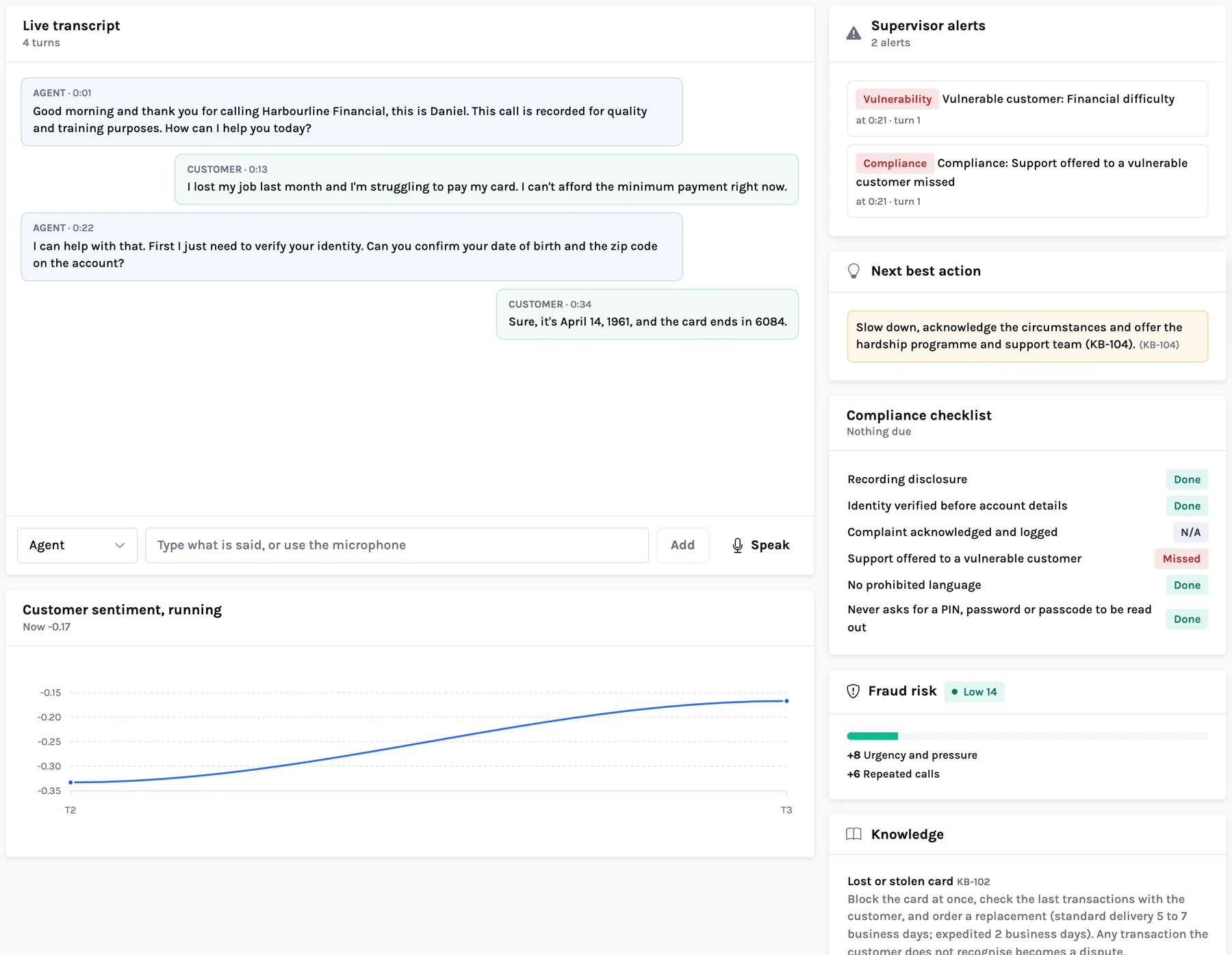
Four panels do the work.
The checklist: what is still due
The checklist is the firm's compliance requirements for this kind of call, the same list the after-call check uses: the recording disclosure, identity verified before account details, the debt-collection disclosure on outbound collections calls, the dispute timeline on card disputes, a complaint acknowledged and logged, support offered to a vulnerable customer, no prohibited language, and never asking for a PIN, password or passcode to be read out. Each line is done (with the turn that satisfied it), due, missed once its window has passed, or not applicable. A requirement that only applies in some situations, such as support for a vulnerable customer, appears when the situation does.
This is the panel agents actually use, because it answers the question they are asking themselves: have I said everything I have to say? It does not ask them to read anything new.
Next best action: one line, once
Prompts come from a short rule list the firm owns (in the demo, nine rules in the pack's assist.json). Each rule names its trigger and the sentence the agent sees:
| Trigger | What the agent sees | Priority |
|---|---|---|
| The recording disclosure is still missing a little into the call | Tell the customer the call is recorded for quality and training. | High |
| Identity is not verified after the opening turns | Verify identity before discussing the account: date of birth and the last four digits of the card. | High |
| The customer is vulnerable | Slow down, acknowledge the circumstances and offer the hardship programme and support team (KB-104). | High |
| The customer asks to cancel | Ask what is prompting the closure, then offer the annual-fee waiver (KB-107). | Medium |
| The customer sounds upset | The customer sounds upset: acknowledge it and say what you will do next. | Medium |
| The customer asks for a manager | Offer to log a formal complaint and a supervisor callback (KB-109). | High |
| The fraud score is elevated | Do not change contact details or add payees on this call; offer to call back on the number on file. | High |
| The caller fishes for credentials | Never ask for or accept a passcode, PIN or password read out on the call (KB-105). | High |
Two design choices keep this quiet. First, each rule fires at most once per call. Second, a prompt about something missing clears itself when the agent does it: say the recording notice and the recording prompt disappears. The agent never has to dismiss a prompt they have already acted on.
In the call above, the customer's first sentence marks them as vulnerable (financial difficulty, found by the same classifier InsightService uses for vulnerability). The hardship prompt appears, and with it the hardship article.
Knowledge: the article's own words
Knowledge answers are the firm's articles, quoted, never paraphrased. An article appears when a rule points at it (the hardship rule names KB-104) or when the last few turns contain one of its keywords. The demo carries nine articles: disputes, lost or stolen cards, late fee refunds, hardship and payment plans, account access and passcodes, changing contact details, annual fees and retention, bereavement, and complaints.
Why quote rather than generate
An agent will repeat what the screen says, to the customer, on a recorded line. If the screen paraphrases a policy, the paraphrase becomes the promise. Live assist only shows an article's own answer, so it never promises what an article does not say, and the firm changes what agents are told by editing one article.
Risk, without the theatre
The fraud panel shows the running score, out of 100, and its reasons, with points: urgency and pressure, repeated calls, a voice that does not match, a device seen on other accounts. In the call above it stays low. When it climbs, the fraud prompt tells the agent what not to do on this call (change contact details, add a payee) and what to offer instead. It does not accuse the caller, and it does not block anything: the agent and, later, a fraud reviewer decide.
Alerts belong to the supervisor
The biggest source of distraction in most assist tools is mixing two audiences on one screen. The agent needs help finishing this call well. The supervisor needs to know which of thirty calls needs them now. InsightCallIQ separates them.
Supervisor alerts are raised for an escalation request, a compliance requirement missed, a prohibited phrase said, a vulnerable customer, a raised voice on the line, and a fraud score in the high band (70 or more). Each alert carries the turn and the quote that raised it, and each kind is raised once per call, so a long argument produces one escalation alert, not twenty.
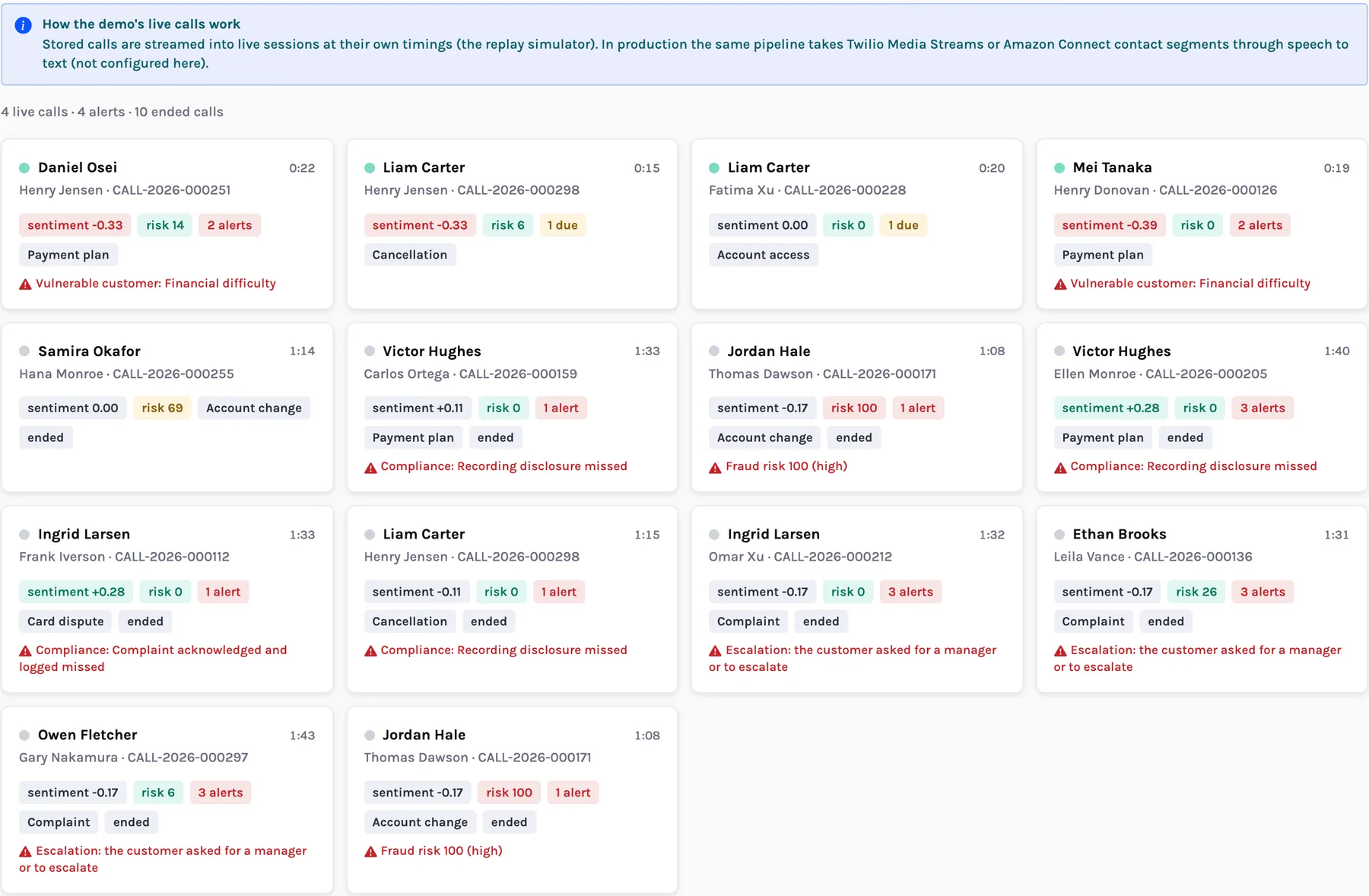
The wallboard lists every live call with its agent, elapsed time, running sentiment, fraud risk, alert count, checklist items still due and the latest alert. A supervisor scanning the floor sees, for example, a vulnerable customer on one call and a missed recording disclosure on another, and opens either with one click to read the transcript so far.
When the call ends
When the session ends, the call summarizer's engine drafts the after-call summary and the CRM wrap-up note from the transcript and the call's measured reason, outcome and moments. They are drafts. The live assist agent's only action, saving the live call's wrap-up note, is capped at L2: it waits for a person. Saving keeps the note on the call; it does not push anything to a CRM on its own.
A suggestion for every keyword, sentiment that moves on every sentence, alerts and tips in one stream, generated wording the agent has to check before repeating.
A checklist of what is still due, one prompt per rule per call that clears itself, quoted articles, and alerts routed to the supervisor once per call.
Trying it before you plug in a phone line
The replay simulator streams stored calls into live sessions at their own timings. On the Live page, Simulate the floor starts four replays at once, a little faster than real time, so the wallboard fills the way it would on a busy morning; Replay a call streams one call. Because a replayed call runs through exactly the same session code as a call from Twilio or Amazon Connect, a team lead can tune the prompts and articles on last week's calls and see what the agent would have seen, before anyone takes a live call with it.
watch
gate
watch
Help the agent finish this call well. Send everything else to the person whose job it is.
The checklist and the prompts are for the agent; the alerts are for the supervisor; the summary and the wrap-up note are for a person to save. Each audience sees only its part, and each prompt appears once.
Where people stay in charge
- A person decides every review: a compliance breach, a fraud alert, a QA dispute, a complaint or a vulnerable customer. When the controls refer it, a lead who did not submit it decides.
- Agents prepare and ask first: every agent action is capped at L2, so a wrap-up note, a calibration request, a watch-list entry or a weekly brief waits for a person to accept it.
- Every score is the engine's: points come from the scorecard's weights and the risk model's reasons, and a drafted sentence with a figure outside the call's facts is thrown away.
- A QA answer stands on a quote: a model answer whose quote is not word for word in the transcript is rejected, and the scorecard's own check stands.
- During a live call the agent decides what to say; live assist shows the checklist, one prompt per rule and the firm's own article text, and alerts go to the supervisor.